Installation
Preparation
- Please read carefully the user license agreement (license.*.txt).
You must accept the agreement before you install or use this software.
System Requirements
- This software has only been extensively tested on a Pocket PC
running the Simplified Chinese version of Windows Mobile 6. If nothing
special happens, it should be runnable on a Smartphone. In any case the
phone must be able to process SMS messages in Simplified Chinese
correctly.
- The size of the installation package is around 500KB. It needs
about 1MB space to be installed on a Windows Mobile 6 phone. Running it
requires extra several hundreds of KB space. If you have a pluggable
phone memory card with 1GB or more space, that's definitely
over-sufficient!
- As Microsoft has announced Windows Mobile 6.1, and Windows Mobile
7 is already under active developemnt, we do not yet have a plan to
test the software on Windows Mobile 5 and earlier versions. It should
be runnable on a Windows Mobile 5 phone, too.
- If the "should"-things do not actually work, please excuse that
we have not widely tested on different platforms. We welcome you to
send us your feedback and experiences with this software on different
phones. Thanks.
Installation Step by Step (Taking a Pocket PC running the Simplified
Chinese version of WM6 as an example, you may refer to the section Illustration of the Installation Process
on the Phone)
- Download from the Internet (URL: DAAV
Intelligent SMS Anti-Spammer for Windows Mobile Beijing Olympic Edition)
the software installation package and save it to your PC harddisk. File
name can be changed at your will.
- Use a USB cable and ActiveSync to establish a connection between
the phone and the PC.
- Use ActiveSync to explore the folders on the phone.
- Copy the installation package
"DAAV.Intelligent.SMS.Anti-Spammer.Beijing.Olympic.Edition-0.061O.CAB"
from your PC to a folder on the phone, e.g. "\Card".
- Use the file explorer to visit the "\Card" folder and find the
installation package
"DAAV.Intelligent.SMS.Anti-Spammer.Beijing.Olympic.Edition-0.061O.CAB"
- Use you hand or the stylus pen to click on the touch screen the
file
"DAAV.Intelligent.SMS.Anti-Spammer.Beijing.Olympic.Edition-0.061O.CAB".
- Windows Mobile will ask you to install the software on the device
or the card, either choice is OK.
- Windows Mobile shows the process of the installation, and tells
you the installation is over after a while.
- Reboot your phone to complete the installation.
- Well, how about sending yourself a spamming or legitimate SMS
message now?
Known Issues
- It happened only once in our tests that, Windows Mobile said the
installation failed after the progress bar went to about half of it
after the cab file was clicked; then we did nothing else but click the
cab file again to relauch the installation process, and then it just
succeeded!
- Please reboot your phone after the file installation is over. In
our tests, sometimes the anti-spammer functioned immediately after the
installation; sometimes it did not work properly until the phone was
restarted.
- If you encounter the problem of certificate of digital signature,
then either you need to install the correct certificates or you have to
unlock your phone. This problem is beyond the scope of this
installation help, as it is a common problem for many different
programs on different phones. Do an Internet search and you find out a
solution very soon.
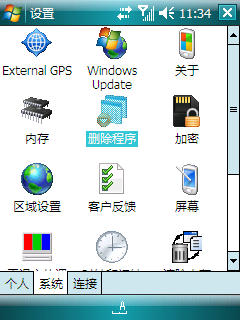
- If you want to uninstall this software, please do it via
"Settings-System-Remove Programs". Windows Mobile will prompt you to
restart the device after the uninstallation. Such a process will clean
this software on your phone. You may refer to the section Illustration of the Uninstallation
Process on the Phone.
Illustration of the Installation
Process on the Phone
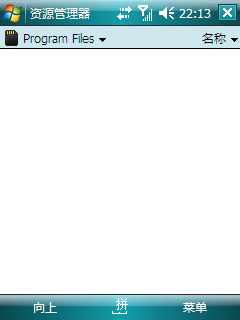
I. Before the installation, we may see that the folder "\Card\Program
Files" has no sub-directories in.
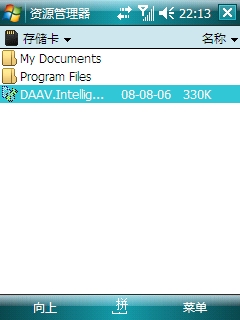
II. Locate and highlight the installation package file in the File
Explorer.
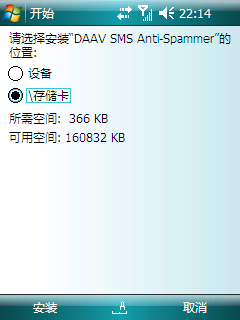
III. Hit Return or click this file to begin the installation. Windows
Mobile asks you for the choice of installation place, we choose the
Card and click "Install".
IV. The progress bar shows the progress of the installation.
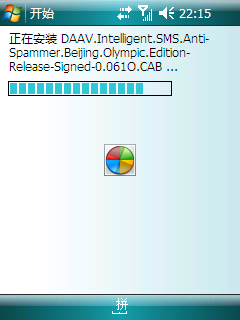
V. Windows Mobile notifies you that the installation of files is over.
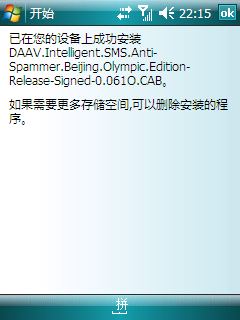
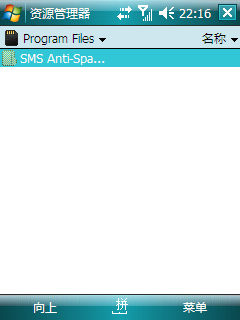
VI. Back to the "\Card\Program Files" folder, we find the newly created
sub-directory, where the DAAV Intelligent SMS Anti-Spammer Olympic
Edition is installed.
VII. Please reboot your device to ensure that the software works
properly.
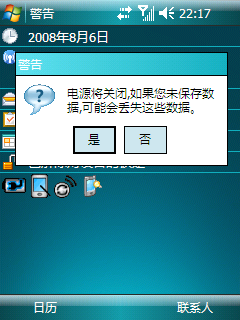
Illustration of the Uninstallation
Process on the Phone
I. Locate the Windows Mobile "Settings-System-Remove Programs" control
panel item
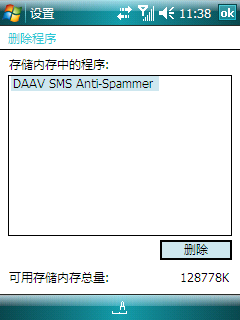
II. Hightlight the program and click "Remove"
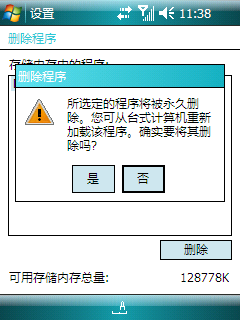
III. Confirm the removal of the software, choose "Yes" or "No"
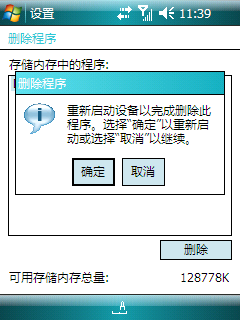
IV. Windows Mobile ask you if you want to reboot the device now, choose
"Yes" to cleanly remove the program from your device.